Veeam RMAN plugin, retention not applied?
Veeam RMAN plugin, retention not applied?
I’ve come across a few situations where **RMAN **backups using the dedicated Veeam plugin didn’t respect the configured retention policy. Specifically, I’d find .vab files in the repository that were months old, even though the retention was set to just 2–3 weeks.
This can happen, for example, if Oracle is using a Recovery Window that’s longer than what’s retained in the Control File. In those cases, you’d typically see warnings in the logs like this:
[03.09...]<xx>oraplug RMAN-07553: warning: RECOVERY WINDOW is more than CONTROL_FILE_RECORD_KEEP_TIME
[03.09...]<xx>oraplug | no obsolete backups found
When that happens, the DBA should make sure that ***CONTROL_FILE_RECORD_KEEP_TIME*** is set to a value longer than the retention configured on the Veeam job.
That said, there’s a relatively new (and a bit hidden) but documented feature in the RMAN plugin that can help: you can force deletion of backup files older than XX days.
https://helpcenter.veeam.com/docs/backup/plugins/force_delete_rman.html?ver=120
While it’s always a good idea to open a support case if you’re unsure, in my opinion, it’s not a bad practice to enable this deletion threshold anyway — just with a value much higher than your regular retention (like 4x longer).
Why? Especially in environments that aren’t tightly monitored, you risk filling up your repo silently, which could eventually block new backups, overflow log areas, and even stop the database. Definitely not fun.
In order to apply this setting, you have to log in in the Oracle server and issue this command:
# OracleRMANConfigTool --set-force-delete
it will interactively print an explanation and as the numer of days you want to set for the forced deletion. I have a 14 days retention and the support suggested to use 60 days to remove old files.

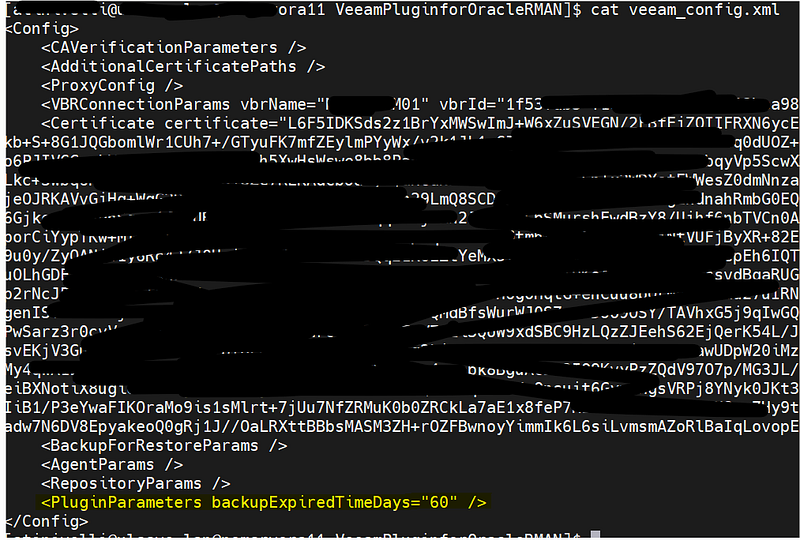
If you need to check whether the setting is already active or not, simply read the veeam_config.xml file and look at the line backupExpiredTimeDays=”60”