Veeam MFA and Four Eyes: caution!
Veeam MFA and Four Eyes: caution!
“I won’t cover the ‘how-to’ stuff, the manual’s pretty clear on that, and the procedures are straightforward.
Man links: Four Eyes, MFA, configuration backup.
I just want to emphasize the risks that doing these operations too casually can bring. These configurations are for limiting unauthorized access (MFA) and preventing unauthorized or incorrect dangerous activities (Four Eyes).

So, it’s quite likely that a wrong configuration could stop us from operating correctly on the Veeam server or even lock us out completely. Before messing with these settings, it’s highly recommended to:
- make an encrypted backup of the Veeam configuration.
- have active support to open a Service Request if needed.
First of all, activating the Four Eyes requires that you have at least two users od user groups defined in the Users & Roles settings
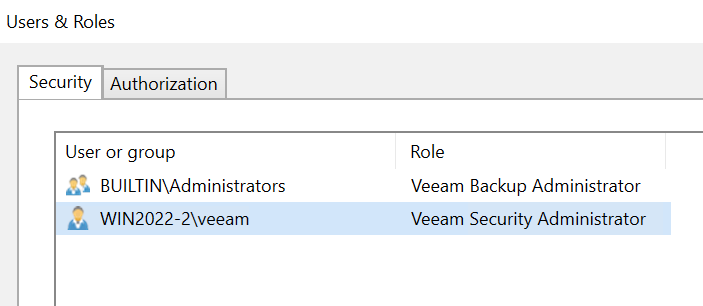
one of the must naturally have the role Veeam Backup Administrator set. The other one can have the same, or Veeam Security Administrator. This is a new role that can basically access the Veeam server in view only mode, and approve/reject requests from the other Administrators. Needless to say, setting up this 4-eyes thing having 2 eyes only could be a problem (glasses don’t count :-D )
To enable MFA you need to remove groups and add single users. One or more user can be excluded by MFA marking them as Service Users (see the little symbol close to the Administrator here)
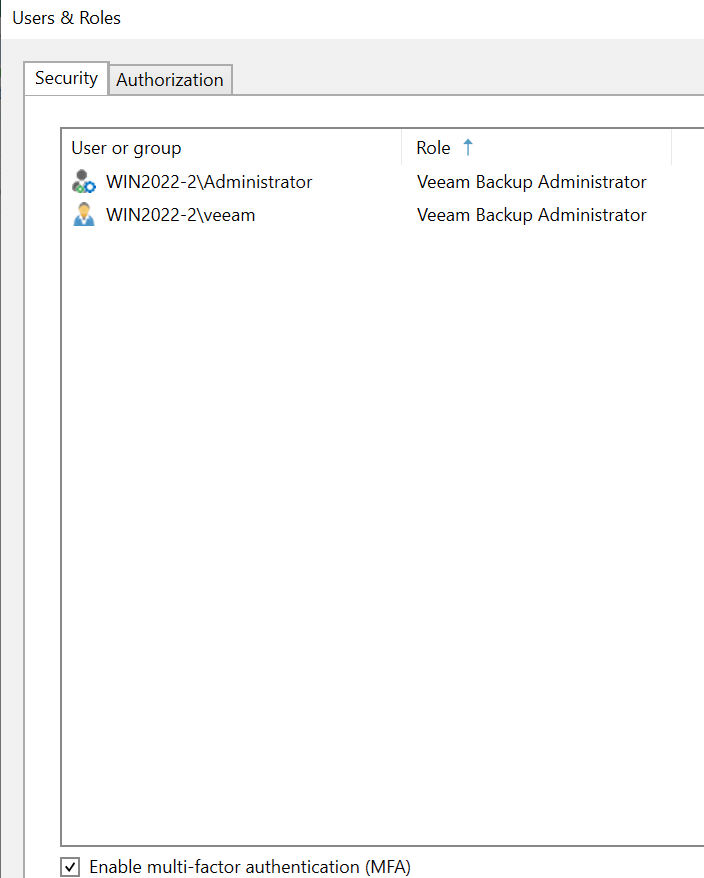
it seems easy but please, please, before you enable MFA check if all the added users can actually log in in Veeam. It would be embarassing if should remove the only access you have to Veeam! And think twice.
Useful tip: when working on the migration from a Server to another one, it’s strongly suggested to double check the Users&Roles settings:
- disable MFA and Four Eyes
- ensure that a user present/recognized in the new server is among Veeam Backup Administrators
- take an encrypted config backup and use this to migrate
- later, think twice and enable MFA and 4-Eyes again
- if something goes wrong and you don’t have a goob B-plan: don’t be shy and open a Service Request with high severity.
Be careful and take backups of your backup server :-D