Veeam ‘hidden switch’ “remove deleted items data after…” and green warnings
Veeam ‘hidden switch’ “remove deleted items data after…” and green warnings
Let’s take a VM backup job that protects, say, 10 virtual machines. At some point, one of those VMs gets excluded — either because it’s been removed, or maybe it’s now being backed up by another job.
On the next job runs, you’ll see a warning — although it’s easy to miss, since it’s one of those rare cases where a warning shows up in green.
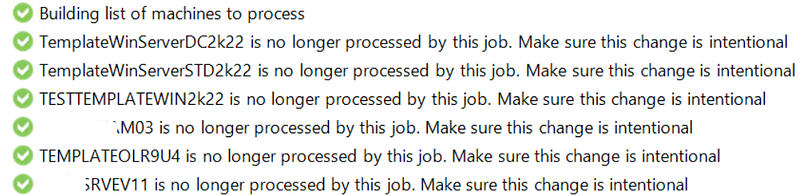
This can go on for months — until you finally remove the remaining restore points for those VMs *manually *from the backup chains.

Why does this happen? Because Veeam, by design, takes a cautious approach — it won’t delete restore points for VMs that might still be useful. Even if a VM is no longer part of the job, its restore points are kept just in case you still need them.
But this can be annoying, so if you activate in the job propertis the **“Remove deleted items data after…” **option, hidden in Storage->Advanced-> Maintenance
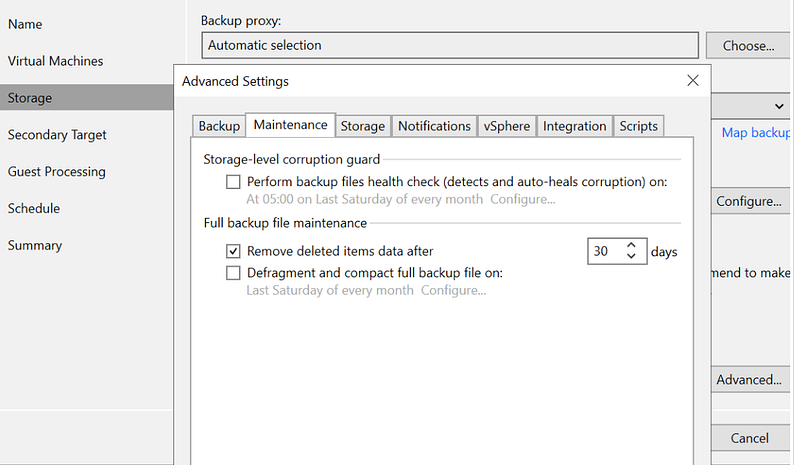
you can tell Veeam to automatically discarge those restore points after a reasoneable time (it could be the same of the main retention for VM still protected by the job).
You can learn much more on this settings and how to use it in the related manual page
Retention Policy for Deleted Items - User Guide for VMware vSphere *In some situations, after you configure and run backup jobs in Veeam Backup & Replication, you may want to change…*helpcenter.veeam.com