Veeam Explorer for Oracle: restore on a different target server
Veeam Explorer for Oracle: restore on a different target server
Veeam Explorer for Oracle is a tool for easy restore of Oracle Databases. It allows the DBa/Backup Admin/Operator to revert/repair a DB on the same server where the backup was taken, or move DBs from the original machine to a different one.
It works with *full image based backups of a Oracle VM *(aka Application Item Restore), or with RMAN Plugins backups.
In case an RMAN plugin backup, in example, was taken on the production server ORA1, it will be possible to perform in place restores simply starting the wizard from the RMAN backup
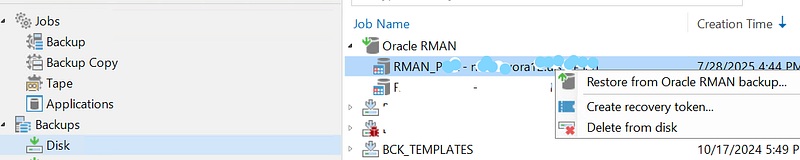
in case you need to restore the DB on another server TST1, maybe dedicated to testing/developement yes, it’s possible to choose it at the “Specify target Linux server….” step. BUT…
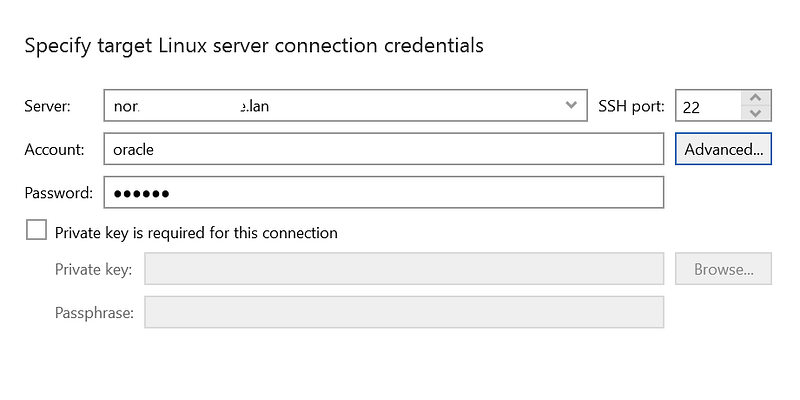
there is a couple of prerequisites to be kept in mind: you have to
1. Specify Authentication Settings
they can be credentials

or recovery token
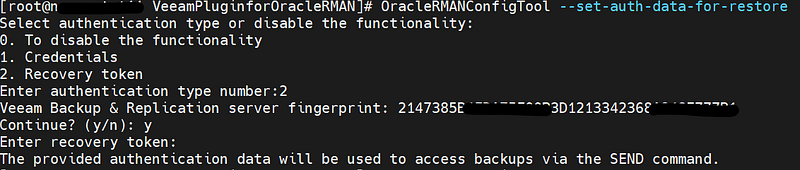
(recovery token must be created from the VBR gui, see the picture above)
2. Select Backup
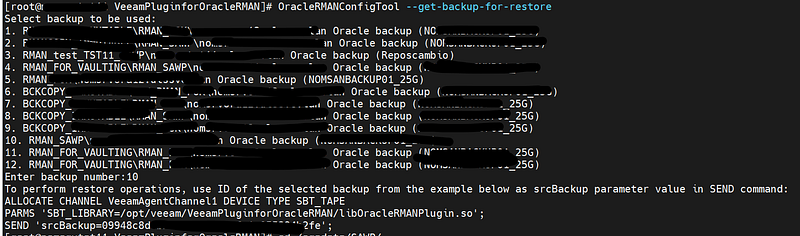
obviously, if you are using the Recovery Token the choice will be limited only to the *tokenized *backups, but don’t skip this step even if you have only one recovery token and so one backup available.
Only after performing these two steps, you will be able to launch the Veeam Explorer for Oracle and restore the RMAN backup created on ORA1 on the target server TST1
Important note: if and after the restore is successfully completed, the database will be active on the target server.
Restore to Another Server - Veeam Plug-ins for Enterprise Applications *If you want to restore Oracle databases from a Veeam Plug-in backup to another server, see this Oracle article and…*helpcenter.veeam.comRestore to Another Server - Veeam Plug-ins for Enterprise Applications *If you want to restore Oracle databases from a Veeam Plug-in backup to another server, see this Oracle article and…*helpcenter.veeam.comBackup and Recovery User’s Guide *Learn how to perform recovery scenarios that are less common or more complicated than the basic scenarios.*docs.oracle.com