Veeam automatic proxy selection during Restore operations
Veeam automatic proxy selection during Restore operations
In the IT world, “automatic” options are often the best, but that’s not always true. Probably AI will make automatic choiches better soon, yes. But in the while it’s wise to review what’s happening behind the scene when a critical restore of a huge VM undergoes. Oh, let’s assume Instant Recovery is not viable (in example: you are restoring from slow, *maybe *deduplicating, appliances…).

In this step of the restore wizard there is a little blue line “Pick proxy to use”, that can be clicked:
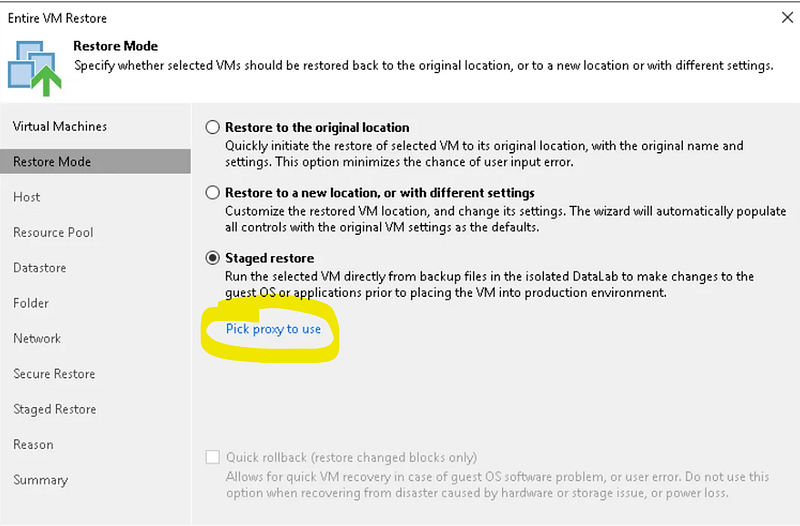
it’s very strange because options are usually accessed by clicking buttons, and because of this, I find this choice pretty strange. Anyway let’s go on: if you don’t access this “lined option”, the proxy selection will be automatic. Let’s read the FAQs and understand how automatic selection works
Q: How is the backup proxy selected in cases when there are multiple proxies available?A: For each VM in the job, backup server classifies all backup proxies available to the job into 3 groups by access type they have to the VM’s disks: SAN (1), hot add (2) and network (3). Proxy with least tasks currently assigned is picked from group 1, and if responding, VM processing task is assigned to this proxy. Otherwise, the next least busy proxy is selected from group 1. If all available proxies group 1 are already running max number of concurrent tasks, selection process switches to group 2 and repeats. Group 3 is only used if groups 1 and 2 have no responding proxies. For group 3, proxy subnet is also considered when picking the best proxy.
this is referred to backups, but we can suppose the same for restores. The first rule is to prefer proxies that have *SAN *access to the datastore, then proxies that can use Hot-Add (mount the disk to be restored on the proxy VM), then proxies that can reach the ESXi management interface via network. “Proxy affinity”, a repository possible configuration, is also considered: the proxy that has been set to be the repo’s best friend (because it can access the repo efficently and fastly) is favourite in the selection. Proxy load is also considered.
This process can produce very good results, or not. Let’s see some caveats:
- proxy with SAN access are very rare. I have never seen one. Storage admins don’t like to zone host and map LUNs to them, except for the ESXi, naturally. (Ok, actually I saw one. When the sys-backup-net-storage admin were the same person: me).
- Hot Add was great when management interfaces where running at 1 Gbit/s. Nowadays they are 10, 40, 100 Gbit/s fast: it’s not so strange to see proxies configured on **NDB **(Network Mode) only. I often do so: it’s easy, it’s safe, and often faster, too.
- Once upon a time, two hosts on the same subnet had no router and firewall between them. Nowadays, that’s not true. Not always at least. That’s why a proxy in the same subnet of the ESXi can be slow too. And let’s consider a pretty normal situation, especially in complex infrastuctures: all the proxies probably are in different subnets from the ESXi’s one. And Veeam cannot know which one of these subnets have faster communication with ESXi.
What’s the solution? Remember that successful backup jobs are not enough:** always test restore jobs, and meter their performances**. Check if the required **RTO **(time needed to recover an asset) can be met. For huge VMs too. Take countermeasures if the current configuration cannot meet the requirements. Remember:
the more you sweat in training, the less you bleed in combat
it’s much better to see you won’t be able to meet RTO during a test, than learning you won’t meet it during a restore of a critical VM!
Understanding and documenting which proxies are to be picked up at that step in the restore wizard can be enough to make your boss/customer/stakeholder satisfied. Otherwise, some architectural changes could be needed. But if you are lucky, you just need to test and better understand the details of the current veeam and hypervisor infrastrucure configuration.