Finding Clusters in AD for proper Veeam’s Protection Group creation (and not only)
Finding Clusters in AD for proper Veeam’s Protection Group creation (and not only)
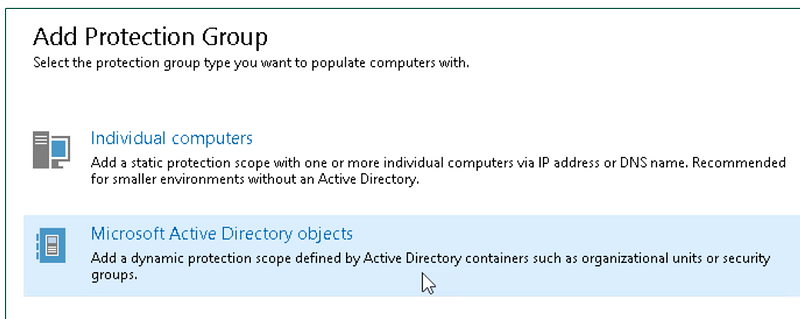
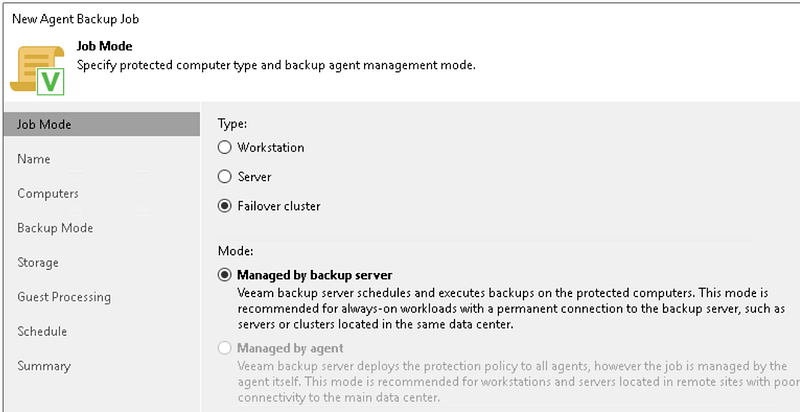
Veeam Agent is able to protect “classic” Windows Failover Clusters with shared disks, but this KB explains that the creation of theProtection Group must be properly done: using the *Microsoft Active Directory objects *option and naming the cluster account, not the individual nodes.
This ensures a correct, not redundant, protection of shared disks.
Creating the PG:
and the job:
in large environment, it’s useful to automate the research of all the clusters present. I tested this script in my lab, and seems to be ok:
GitHub - tinto1970/AD-PSCollection-ListClusters: produces a list of clusters in AD *produces a list of clusters in AD. Contribute to tinto1970/AD-PSCollection-ListClusters development by creating an…*github.com
usage is:
.\listcluster.ps1 -Domain domain.lan -OutputPath C:\temp\clusters.csv
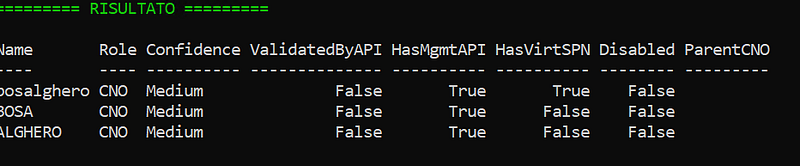
and produces an output like this, where HasVirtsSPN=True means “this is the cluster name”
and this .csv
"Name","Role","Confidence","ValidatedByAPI","HasMgmtAPI","HasVirtSPN","Disabled","DNSHostName","ParentCNO"
"bosalghero","CNO","Medium","False","True","True","False","bosalghero.ichnusa.lan",
"BOSA","CNO","Medium","False","True","False","False","bosa.ichnusa.lan",
"ALGHERO","CNO","Medium","False","True","False","False","alghero.ichnusa.lan",
my cluster **bosalghero **has two nodes: ALGHERO and BOSA. The cluster name has to be added in the PG, and Veeam will install the agents in all the needed nodes.
P.S.: feel free to (ab)use the script for non-Veeam related tasks ;-)